
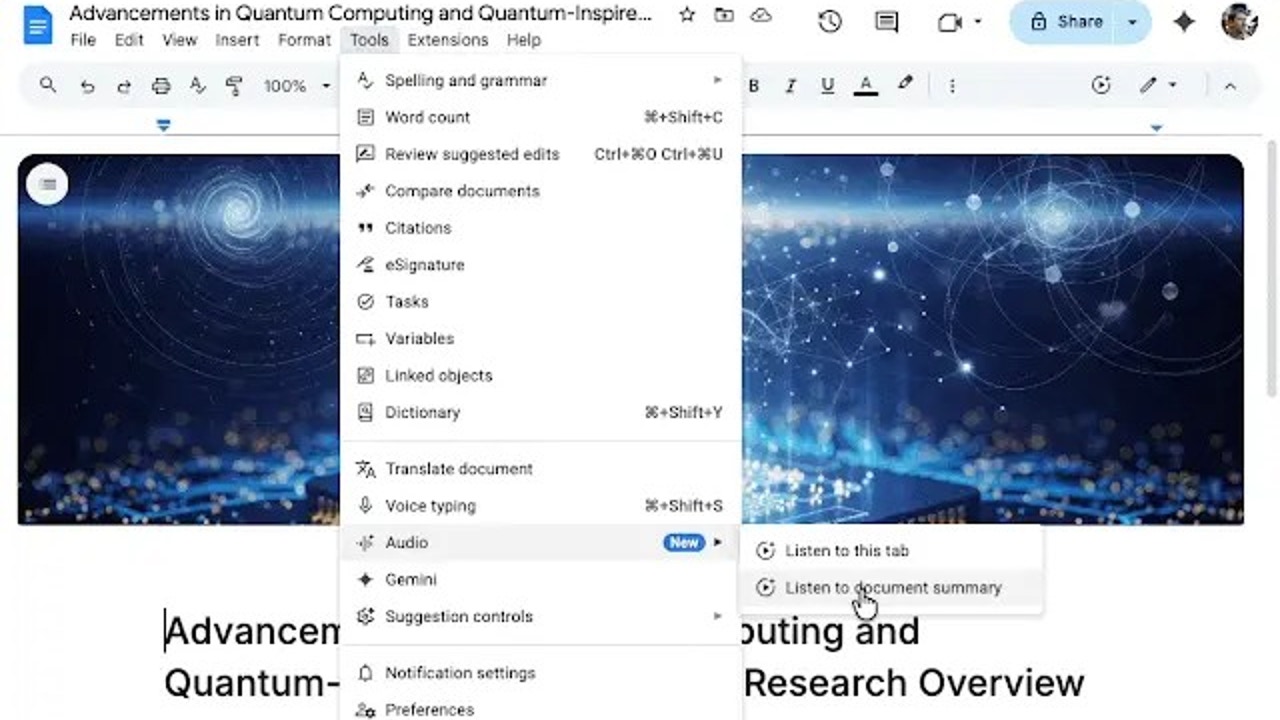
Google has begun to deploy in Google Docsyour text editor integrated with Drivea new artificial intelligence function that promises to be quite useful. The app now uses GeminiGoogle’s AI assistant, to generate an audio summary of the contents of the documentsalthough it is not something that all users can use.
It is not the first function in this line that Docs incorporates. Google already launched last year an in-app readeralso based on Gemini, capable of narrating entire documents. The addition of summaries further expands the text editor’s AI capabilities.
According to the company, the audio summaries ‘provide a brief verbal synopsis of the contents of the document, including several tabs’. They usually last a few minutes and use a natural delivery style, similar to what Gemini uses in its own application.
Users can customize these AI-generated summaries to some extent, choosing different voices or adjusting the playback speed. Among the available styles are narrator, persuasive, coach, among others.
To access the audio summaries in the web version, go to Tools >Audio and select the new option Listen to document summary. When you do this, it will appear a small player with a timeline from which the summary of the current document can be reproduced.
Google has begun rolling out this feature globally this Thursday and plans to complete the process within approximately 15 days. Please note that AI audio summaries in Google Docs are not available to all users, as Access is granted to subscribers of AI services and enterprise plans. As has happened with other AI features, it will hopefully eventually reach free Google account users.
Currently, users on the following plans can use this feature:
- Business Standard and Plus.
- Enterprise Standard and Plus.
- Google AI Ultra for Business plugin.
- Google AI Pro for Education plugin.
- Google AI Pro and Ultra.
This tool will be particularly useful for those who work with long text documents and do not want or do not have time to read it completely or listen to a full narration of it to get an idea of the content. As Google explains in a post, audio summaries ‘help you quickly catch up and understand the most important parts of your content. For example, you can catch up on your notes before a meeting or summarize a long report and access highlights in just a few minutes‘.